 Jérémy MandWeiko
d99b9d1d6b
Jérémy MandWeiko
d99b9d1d6b
### Overview

This PR introduces significant enhancements to the MessageQueue module
by integrating `@Processor`, `@Process`, and `@InjectMessageQueue`
decorators. These changes streamline the process of defining and
managing queue processors and job handlers, and also allow for
request-scoped handlers, improving compatibility with services that rely
on scoped providers like TwentyORM repositories.

### Key Features

1. **Decorator-based Job Handling**: Use `@Processor` and `@Process`
decorators to define job handlers declaratively.
2. **Request Scope Support**: Job handlers can be scoped per request,
enhancing integration with request-scoped services.

### Usage

#### Defining Processors and Job Handlers

The `@Processor` decorator is used to define a class that processes jobs
for a specific queue. The `@Process` decorator is applied to methods
within this class to define specific job handlers.

##### Example 1: Specific Job Handlers

```typescript
import { Processor, Process, InjectMessageQueue } from 'src/engine/integrations/message-queue';

@Processor('taskQueue')
export class TaskProcessor {

  @Process('taskA')
  async handleTaskA(job: { id: string, data: any }) {
    console.log(`Handling task A with data:`, job.data);
    // Logic for task A
  }

  @Process('taskB')
  async handleTaskB(job: { id: string, data: any }) {
    console.log(`Handling task B with data:`, job.data);
    // Logic for task B
  }
}
```

In the example above, `TaskProcessor` is responsible for processing jobs
in the `taskQueue`. The `handleTaskA` method will only be called for
jobs with the name `taskA`, while `handleTaskB` will be called for
`taskB` jobs.

##### Example 2: General Job Handler

```typescript
import { Processor, Process, InjectMessageQueue } from 'src/engine/integrations/message-queue';

@Processor('generalQueue')
export class GeneralProcessor {

  @Process()
  async handleAnyJob(job: { id: string, name: string, data: any }) {
    console.log(`Handling job ${job.name} with data:`, job.data);
    // Logic for any job
  }
}
```

In this example, `GeneralProcessor` handles all jobs in the
`generalQueue`, regardless of the job name. The `handleAnyJob` method
will be invoked for every job added to the `generalQueue`.

#### Adding Jobs to a Queue

You can use the `@InjectMessageQueue` decorator to inject a queue into a
service and add jobs to it.

##### Example:

```typescript
import { Injectable } from '@nestjs/common';
import { InjectMessageQueue, MessageQueue } from 'src/engine/integrations/message-queue';

@Injectable()
export class TaskService {
  constructor(
    @InjectMessageQueue('taskQueue') private readonly taskQueue: MessageQueue,
  ) {}

  async addTaskA(data: any) {
    await this.taskQueue.add('taskA', data);
  }

  async addTaskB(data: any) {
    await this.taskQueue.add('taskB', data);
  }
}
```

In this example, `TaskService` adds jobs to the `taskQueue`. The
`addTaskA` and `addTaskB` methods add jobs named `taskA` and `taskB`,
respectively, to the queue.

#### Using Scoped Job Handlers

To utilize request-scoped job handlers, specify the scope in the
`@Processor` decorator. This is particularly useful for services that
use scoped repositories like those in TwentyORM.

##### Example:

```typescript
import { Processor, Process, InjectMessageQueue, Scope } from 'src/engine/integrations/message-queue';

@Processor({ name: 'scopedQueue', scope: Scope.REQUEST })
export class ScopedTaskProcessor {

  @Process('scopedTask')
  async handleScopedTask(job: { id: string, data: any }) {
    console.log(`Handling scoped task with data:`, job.data);
    // Logic for scoped task, which might use request-scoped services
  }
}
```

Here, the `ScopedTaskProcessor` is associated with `scopedQueue` and
operates with request scope. This setup is essential when the job
handler relies on services that need to be instantiated per request,
such as scoped repositories.

### Migration Notes

- **Decorators**: Refactor job handlers to use `@Processor` and
`@Process` decorators.
- **Request Scope**: Utilize the scope option in `@Processor` if your
job handlers depend on request-scoped services.

Fix #5628

---------

Co-authored-by: Weiko <corentin@twenty.com>

The #1 Open-Source CRM
Tailored to your unique business needs
🌐 Website · 📚 Documentation ·  Discord ·
  Figma
Figma
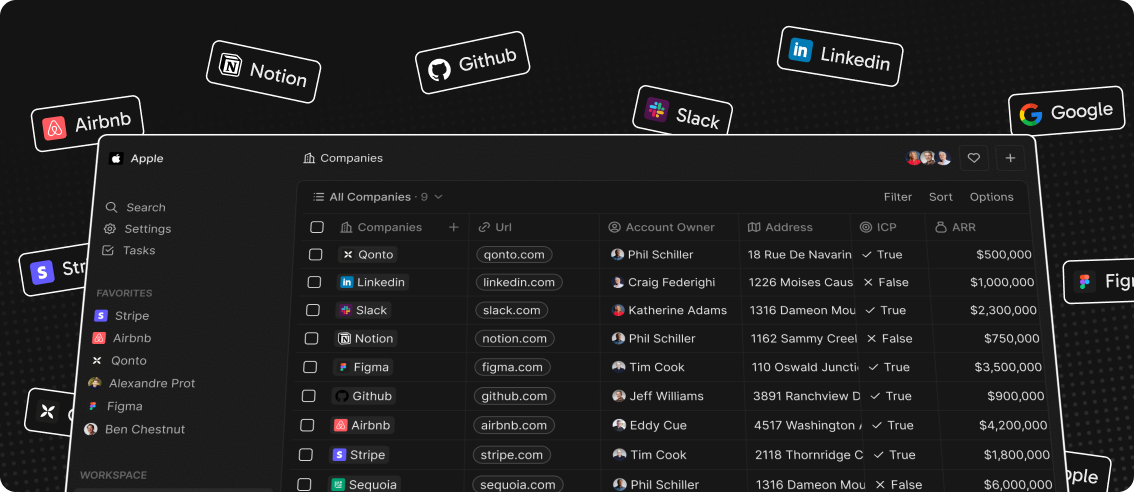
We’ve spent thousands of hours grappling with traditional CRMs like Pipedrive and Salesforce to align them with our business needs, only to end up frustrated — customizations are complex and the closed ecosystems of these platforms can feel restrictive.
We felt the need for a CRM platform that empowers rather than constrains. We believe the next great CRM will come from the open-source community. We’ve packed Twenty with powerful features to give you full control and help you run your business efficiently.
Demo
Go to demo.twenty.com and login with the following credentials:
email: noah@demo.dev
password: Applecar2025
See also:
🚀 Self-hosting
🖥️ Local Setup
Why Choose Twenty?
We understand that the CRM landscape is vast. So why should you choose us?
⛓️ Full control, Full Freedom: Contribute, self-host, fork. Break free from vendor lock-in and join us in shaping the open future of CRM.
📊 Data, Your Way: The days when the role of CRM platforms was to shift manual data entries to a database are over. Now, the data is already there. CRM 2.0 should be built around your data, allowing you to access and visualize any existing sources, not forcing you to retrofit your data into predefined objects on a remote cloud.
🎨 Effortlessly Intuitive: We set out to create something that we ourselves would always enjoy using. The main application draws inspiration from Notion, a tool known for its user-friendly interface and customization capabilities.
What You Can Do With Twenty
We're currently in the development phase of Twenty's alpha version.
Please feel free to flag any specific need you have need by creating an issue.
Below are some features we have implemented to date:
- Add, filter, sort, edit, and track customers
- Create one or several opportunities for each company
- See rich notes tasks displayed in a timeline
- Create tasks on records
- Navigate quickly through the app using keyboard shortcuts and search
Add, filter, sort, edit, and track customers:

Create one or several opportunities for each company:

Track deals effortlessly with the email integration:

Tailor your data model to meet business needs:
See rich notes displayed in a timeline:
Create tasks on records

Navigate quickly through the app using keyboard shortcuts and search:

Connect your CRM to all your tools through our APIs and Webhooks.
What's In Store
Here’s what you can look forward to:
⏳ Frequent updates: We’re shipping fast! Expect regular updates and new features that enhance your experience.
🔗 Extensibility: We’re putting the power in your hands. Soon, you’ll have the tools to extend and customize Twenty with plugins and more.
Join the Community
- Star the repo
- Join discussions and track issues
- Follow us on Twitter or LinkedIn
- Join our Discord
- Contributions are, of course, most welcome!